Phone Tracker : Family Tracker
- 4.1
- Rating
- 10.00M
- Installs
- Free
- Price
 Analysis by App-foxy
Phone Tracker: Family Tracker is the kind of Android app I would consider when the main problem is simple: keeping track of a small group of people without repeatedly asking where everyone is. Its focus is location sharing on a GPS map, and that single purpose shapes the whole experience. Rather than treating navigation as a way to find restaurants or plan routes, it turns the phone into a shared point on a map for staying connected.
I found the idea most useful when everyone involved agrees to share their location for a practical reason. A family member arriving home, friends trying to meet in a busy area, or a group coordinating during a day out can all benefit from seeing where people are. The important distinction is that this is not a tool for secretly finding someone. Its value depends on clear consent and on the people in the group understanding when location sharing is appropriate.
Developed by Code Cookies, the app is free and sits in the Maps & Navigation category. It has an Everyone content rating and supports devices running Android 8.0 or later. The current release is version 2.7, and its reach is already substantial, with over ten million installs. Those details make it an accessible option for households using a mixture of older and newer Android phones.
You May Also Like

 AccuWeather: Weather Radar
AccuWeather Review: A Quick, Clear Forecast for Everyday Decisions
For everyday plans, the best forecast is the one you can understand quickly. AccuWeather makes rain timing, radar, and local conditions easy to act on, with a few trade-offs.

 Hill Climb Racing
Why Hill Climb Racing Still Turns Crashes Into One More Run
A tiny car, a bumpy hill and one more upgrade: Hill Climb Racing keeps resurfacing because its simple chaos makes every near-miss feel personal.

 AliExpress - Shopping App
AliExpress Makes Global Shopping Feel Personal, but Shoppers Bear the Risk
AliExpress turns a global marketplace into a pocket-sized discovery engine. Its reach is useful, its shopping loop compelling, and its trade-offs easy to miss.

 Lords Mobile: Kingdom Wars
Lords Mobile Is a Kingdom-Building Routine, Not a Quick Match
A case-by-case verdict on the building, battles, device demands, and social commitments that make Lords Mobile rewarding for some players and exhausting for others.

 PDF Scanner app - TapScanner
TapScanner Makes Paperwork Easier to Capture, Check, and Share
TapScanner makes scanning with a phone feel less like a rescue operation and more like a dependable step in getting work done. Its capture tools are useful, though not flawless.

 Block Blast!
 Shows How Much a Puzzle Game Can Leave Out
A quiet grid game shows why puzzle players increasingly value instant clarity, repeatable skill and low-pressure play—and where the genre still needs to catch up.
More From Our News Desk
View All News


Location sharing is the feature that matters most
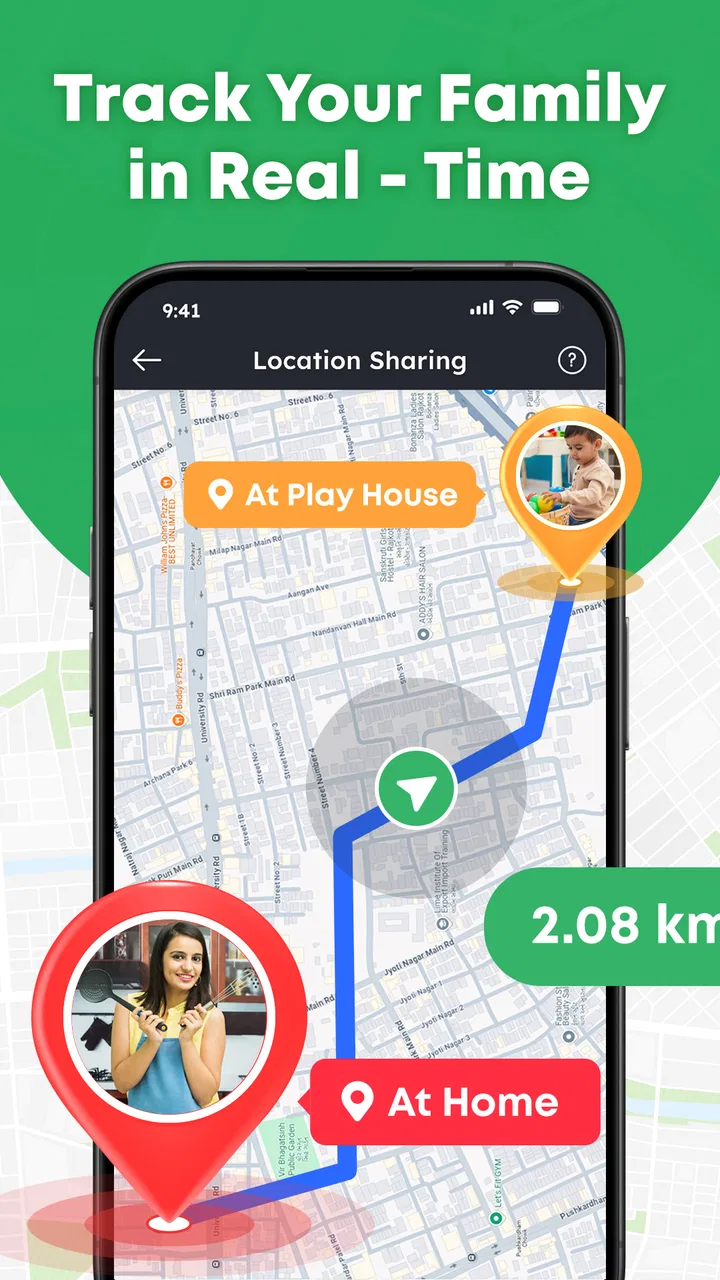
The central capability is live location sharing through a GPS map. In practical terms, the app is designed to make a person’s position visible to the people they are connected with, so the group can check the map instead of relying entirely on calls or messages. That sounds modest, but it changes the rhythm of everyday coordination. A quick glance can replace several “Are you close?” messages, especially when plans involve multiple people.
What I like about this approach is its clarity. The map gives a visual answer rather than a vague status such as “on my way.” That can be useful when someone is moving through a large campus, meeting friends at an event, or trying to find a family member in an unfamiliar part of town. It also helps reveal the difference between someone who has just left and someone who is already nearby but stuck in a crowded location.
The strongest benefit is not precision for its own sake. It is reduced uncertainty. When a group shares locations willingly, everyone can make better decisions about timing and meeting points. I would use it to coordinate people who are already in contact, not as a replacement for emergency services or as a guarantee that a map position will always tell the complete story.
What the map changes in everyday coordination
Most messaging apps can share a location in a single conversation, but that process often feels temporary and scattered. A dedicated phone-tracking app gives the location-sharing task its own place. Instead of searching through an old chat for a pin, I can think of the map as the shared reference point for the group. That is particularly helpful when the same people need to coordinate more than once.
There is also a useful social advantage: the map can reduce unnecessary interruptions. If I am waiting for someone, I do not need to call every few minutes simply to ask whether they have started moving. At the same time, I would avoid treating the visible position as a promise of arrival. GPS information describes where a phone is, not necessarily what the person is doing, whether they can answer, or how quickly they can reach the destination.
That distinction is one of the most important things to understand before using the app. Location sharing improves awareness, but it does not remove the need for communication. A person may leave their phone somewhere, lose connectivity, or stop moving for a reason that the map cannot explain. I see the app as a coordination aid, not as a substitute for judgment.
How I would set up a useful sharing routine
I would begin with a small, clearly defined group rather than sharing broadly. A practical arrangement might include the people who are traveling together or the family members who regularly need to coordinate pickups. Keeping the circle focused makes the map easier to interpret and avoids turning a helpful tool into a constant stream of information.
Before relying on it, I would also agree on the purpose of sharing. For example, a group might use it while traveling to a meeting point and stop using it after everyone arrives. That simple rule prevents location sharing from becoming an automatic expectation. It also makes consent more meaningful because each person knows why the map is being used and when the activity should end.
A small but valuable habit is to confirm the context through a message when the map looks surprising. If somebody appears stationary, I would not immediately assume there is a problem. I would ask whether they are waiting, indoors, or dealing with a delay. This workflow combines the app’s visual awareness with ordinary communication, which is safer and more reliable than treating the map as an unquestionable source of truth.
How Phone Tracker: Family Tracker works in practice
In use, the experience revolves around the GPS map and the people whose locations are being shared. The appeal is immediate: open the app, look at the map, and understand the group’s general position. That makes it easier to coordinate than a system where every person must describe their location manually. The app’s short store description calls it a phone tracker, but I think of it more accurately as a shared awareness tool for people who have chosen to stay connected.
The quality of that experience depends on the phones and the surrounding conditions. A map can only be useful when the device can determine and transmit a location. Indoor environments, dense urban areas, battery-saving behavior, and interrupted connections can all affect how current or useful a position appears. These are not reasons to dismiss the app, but they are reasons to leave room for uncertainty.
I would therefore avoid using a single map check as the basis for a high-stakes decision. If someone is late for an important appointment, the right response is still to call or message them. The app is better at answering “Where does the phone appear to be?” than “What happened?” That limitation is easy to overlook because a moving dot feels more definitive than it really is.
A realistic day-to-day example
Imagine a family meeting at a busy outdoor venue. One person arrives early, another is traveling from work, and a third is bringing a child from a different direction. Instead of choosing one exact entrance and repeatedly updating the plan in a group chat, they can use the shared map to see who is approaching and decide whether to wait, move closer to an entrance, or choose a quieter meeting point.
In that situation, the benefit is not that the app plans the entire outing. It simply gives the group a common picture. The person already at the venue can notice that the others are still some distance away, while the travelers can see whether the meeting point is still sensible. If the venue has several entrances, a quick message can complete the job: the map shows the general position, and the message confirms the exact place.
This is where I think the app earns its place. It handles the repetitive part of coordination while leaving decisions to the people involved. It can be more convenient than sending a fresh location pin every time, particularly for groups that meet often. However, if the group only needs to share a location once, the location feature already built into a messaging app may be quicker.
Questions about compatibility and cost
The app is free, which lowers the barrier for a family or friend group that wants to try it without committing to a subscription. It is an Android app, and the stated minimum operating system is Android 8.0. That means I would check the software version on every phone in the group before planning around it, especially if someone uses an older device.
The Everyone rating makes it suitable for general audiences, but that rating should not be confused with a recommendation to give children unrestricted location access. For younger users, I would involve a responsible adult in the setup and agree on clear boundaries. The most important safeguard is not the age label; it is making sure every participant understands who can see the location and why sharing is happening.
The app comes from Code Cookies, and its scale suggests that it is not an obscure experiment. Still, popularity alone does not make it the right choice for every household. I would judge it by whether the people I need to coordinate with are comfortable using the same app and whether its map-based approach fits our routine.
The best use case is shared movement, not constant surveillance
For me, the strongest scenario is a group that is actively moving toward a shared destination. Friends traveling separately to an event, relatives coordinating a pickup, or a family trying to reconnect after splitting up can all benefit from a common map. In these cases, location sharing has a clear beginning, a clear purpose, and a natural end.
The app is also useful when people are unfamiliar with the area. A written description such as “I am near the north side” can be difficult to interpret, while a map gives everyone the same visual reference. That can reduce the number of wrong turns and help a group choose a meeting point that is realistic for everyone’s current position.
A less obvious use is managing changing plans without making one person the information hub. In a group chat, one person may receive updates from several others and then repeat them to the group. A shared map can distribute that awareness more evenly. Each participant can check the situation directly, which reduces the chance that an outdated message becomes the plan everyone follows.
There is a trade-off here: more visibility can create more pressure. If people begin expecting immediate explanations whenever a dot stops moving, the app may make a relaxed outing feel monitored. I would recommend agreeing that the map is for coordination, not for judging speed, detours, or personal time. That boundary is essential if the app is going to remain helpful.
Three practical habits that improve the experience
- Use the map to choose meeting points, not just to watch arrival. If people are approaching from different directions, look for a place that reduces the total confusion rather than insisting on one fixed entrance.
- Pair map checks with a short confirmation message. The position can show where a phone is, while a message can explain whether the person is waiting, walking, or unable to meet at that spot.
- Define a sharing window for each outing. Starting location sharing when coordination begins and ending it when the group is together keeps the feature purposeful instead of turning it into a permanent expectation.
These habits may sound simple, but they address the app’s biggest practical weakness: a GPS map can look more complete than the underlying situation really is. A disciplined routine keeps the useful part—the shared awareness—without allowing the map to dominate every decision.
Where the convenience comes with trade-offs
The first trade-off is privacy. Location is sensitive information, and sharing it should be treated differently from sharing a casual status update. I would only include people I trust, explain the reason for the group, and revisit the arrangement when the situation changes. A family trip and a permanent location-sharing expectation are not the same thing.
The second trade-off is battery and connectivity in ordinary use. Any location-based experience depends on a phone being able to determine its position and communicate it. When those conditions are poor, the map may be less useful than expected. For that reason, I would not let the app replace a meeting plan, a charged phone, or a backup way to contact someone during a long journey.
The third is interpretation. Seeing a person’s marker can encourage assumptions about what they are doing. A stationary marker might mean they are waiting, indoors, or simply not moving at that moment. A moving marker does not prove that they are headed to the agreed destination. The app provides context, but the people using it still need to communicate respectfully.
There is also a question of fit. If I mainly need turn-by-turn directions, traffic information, public transport planning, or a one-time pin, a conventional navigation app or messaging service may be more direct. Phone Tracker: Family Tracker makes more sense when the recurring need is keeping a selected group connected on a shared map.
When I would choose another option
I would skip this app if the people involved are uncomfortable with location sharing or if the group cannot agree on sensible boundaries. No map convenience is worth creating a situation where someone feels watched. I would also choose a different tool when the main job is route planning rather than seeing where friends or relatives are.
For a single meeting, sending a temporary location from a messaging app may involve fewer steps. For professional fleet coordination, a specialized service may offer controls that a general family tracker is not designed to provide. For emergencies, I would contact the appropriate emergency service instead of assuming that a consumer map will explain a person’s condition.
These comparisons do not make the app weak; they clarify its role. It is a focused solution for voluntary, group-based awareness. Its strength comes from being easy to understand, while its limitation is that it does not turn location data into a complete safety system or a full navigation platform.
Who gets the most from this app
I think Phone Tracker: Family Tracker is best for families and friends who regularly coordinate movement and want something more visual than repeated text updates. It can be especially convenient for groups that meet in crowded places, travel separately to the same destination, or often need to adjust plans while people are already on the move.
It may also suit households with different Android phone ages because support begins at Android 8.0 rather than requiring a very recent device. Since it is free, trying it with a small group is relatively straightforward. I would start with one specific use case, such as coordinating a weekend outing, before deciding whether it deserves a permanent place in everyone’s routine.
Parents and guardians should approach it as a conversation tool as much as a technical one. Younger family members need to understand what sharing means, who can see the location, and when it is reasonable to stop sharing. The Everyone rating makes the app broadly accessible, but responsible use still depends on the adults and participants setting the rules.
People who value independence may prefer not to share continuously, and they should not be pressured into doing so. The app works best when the group sees it as a convenience they can use for a defined purpose, not as proof of trust or a requirement for participation. That distinction determines whether the experience feels reassuring or intrusive.
After reviewing its central location-sharing role, my opinion is positive but measured. The app solves a real coordination problem by giving a group a shared visual reference, and its free availability makes that idea easy to test. I would recommend it to someone who frequently asks friends or relatives for updates about where they are, provided everyone agrees on the boundaries first.
My main recommendation is to treat the map as a helpful snapshot, not a complete explanation of someone’s situation. Use it to choose better meeting points, reduce repetitive messages, and stay connected while people are traveling. Keep ordinary communication and common sense alongside it, and Phone Tracker: Family Tracker becomes a practical companion for group movement rather than an uncomfortable surveillance tool.
For that specific purpose, Phone Tracker: Family Tracker is worth considering. It is not the universal answer for navigation, emergencies, or every kind of location need, but it has a clear role. If that role matches the way your family or friends already coordinate, the shared GPS map can make everyday plans noticeably easier.
FAQs for Phone Tracker : Family Tracker
01What is Phone Tracker: Family Tracker used for?
Phone Tracker: Family Tracker is designed to help families share and view the real-time or recent location of connected members on a private map. After creating or joining a family group, users can check where approved contacts are, coordinate meetups, and receive location-related updates. It is mainly intended for family safety and communication, rather than monitoring people without their knowledge or permission.
02Does Phone Tracker: Family Tracker require permission from everyone?
Yes. Location tracking depends on permissions granted by the people being added to the family group. Each member generally needs to install or access the service, sign in, and allow location access on their device. Users should explain how tracking works before inviting someone, because secretly monitoring another person may violate privacy expectations, local laws, or the application’s terms of service.
03How accurate is the location shown in the app?
The location displayed by Phone Tracker: Family Tracker can vary depending on GPS signal, Wi-Fi availability, mobile network coverage, battery-saving settings, and whether the device is indoors or moving. It should be treated as an approximate position rather than a guaranteed pinpoint location. If a phone loses connectivity, disables location services, or restricts background activity, updates may be delayed.
04Will Phone Tracker: Family Tracker drain my phone battery or use mobile data?
Because the app may use GPS, Wi-Fi, mobile networks, and background activity to update a member’s position, it can increase battery consumption compared with an app that is used only occasionally. Data usage is usually moderate, but it depends on update frequency and how often the map is opened. Reviewing background permissions and battery settings can help balance tracking and battery life.
05Is Phone Tracker: Family Tracker free to download and use?
The app may be available to download without an upfront charge, but some features can depend on subscriptions, in-app purchases, account limits, or regional availability. Before creating a family group, check the current store listing for pricing, trial conditions, renewal details, and supported devices. Also review the privacy policy to understand how location information and account data are handled.
Pros
- Real-time location sharing helps families coordinate meetups and daily routines.
- Geofenced place alerts can notify you when members arrive or leave.
- Location history may help review recent trips and identify unusual movement.
- SOS features can provide a quick way to alert selected family members.
- Supports family-focused tracking instead of relying on public social networks.
Cons
- Accurate tracking depends heavily on GPS
- mobile data
- and battery availability.
- Continuous location access can noticeably increase battery consumption.
- Some features may require a paid subscription or in-app purchases.
- Location updates can be delayed indoors or in areas with weak signal.
- All family members must consent to sharing their location for proper use.

Phone Tracker : Family Tracker
Gallery